The B2B Attribution System
Everyone wants an attribution model. The model only works if the chain underneath it holds: links tagged the same way, sources captured on every form, a CRM that keeps them, and a model everyone agreed on before the report went to the board.
The B2B Attribution System is that chain, built the way I’d build it on a paid engagement and written down so your team can set it up without me. Working files, field maps, playbooks and a dashboard.
What to expect on time: the core (UTM rules, hidden fields, first-touch capture) takes a weekend or a couple of focused days. Everything else, including the sync, cleanup and dashboard, takes 1 to 2 weeks depending on your forms, your CRM access and who has to sign off. Cleanup can re-sort the history you have, but it can't recover touches that were never recorded, so trustworthy reports build up over the weeks after setup.
$399
One-time payment · instant download
What's inside
| Piece | What it does |
|---|---|
| UTM system | The locked UTM builder, channel code library and governance rules, so every link gets tagged the same way. (The $79 UTM System is included.) |
| GA4 and GTM event map | Which events to track, how to name them and how to set them up, so conversions mean the same thing everywhere. |
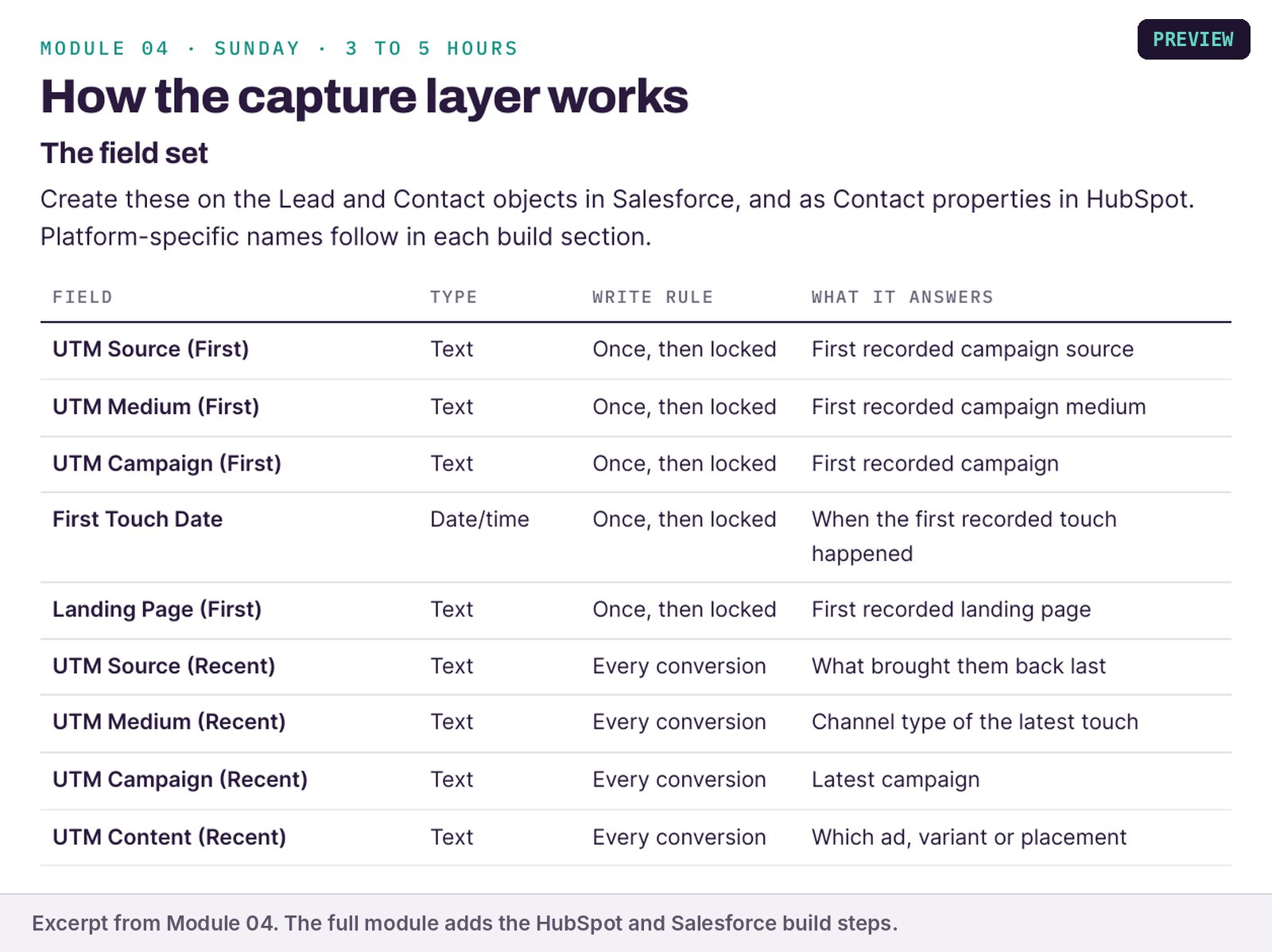
| CRM field maps | The source and UTM fields HubSpot or Salesforce needs, including first-touch fields that never get overwritten. |
| Model decision guide | How to choose first touch, last touch, linear or W-shaped for your stage and data, and how to explain the choice to leadership. |
| Rebucketing playbook | How to clean up the historical data that's already sitting in the wrong channel. |
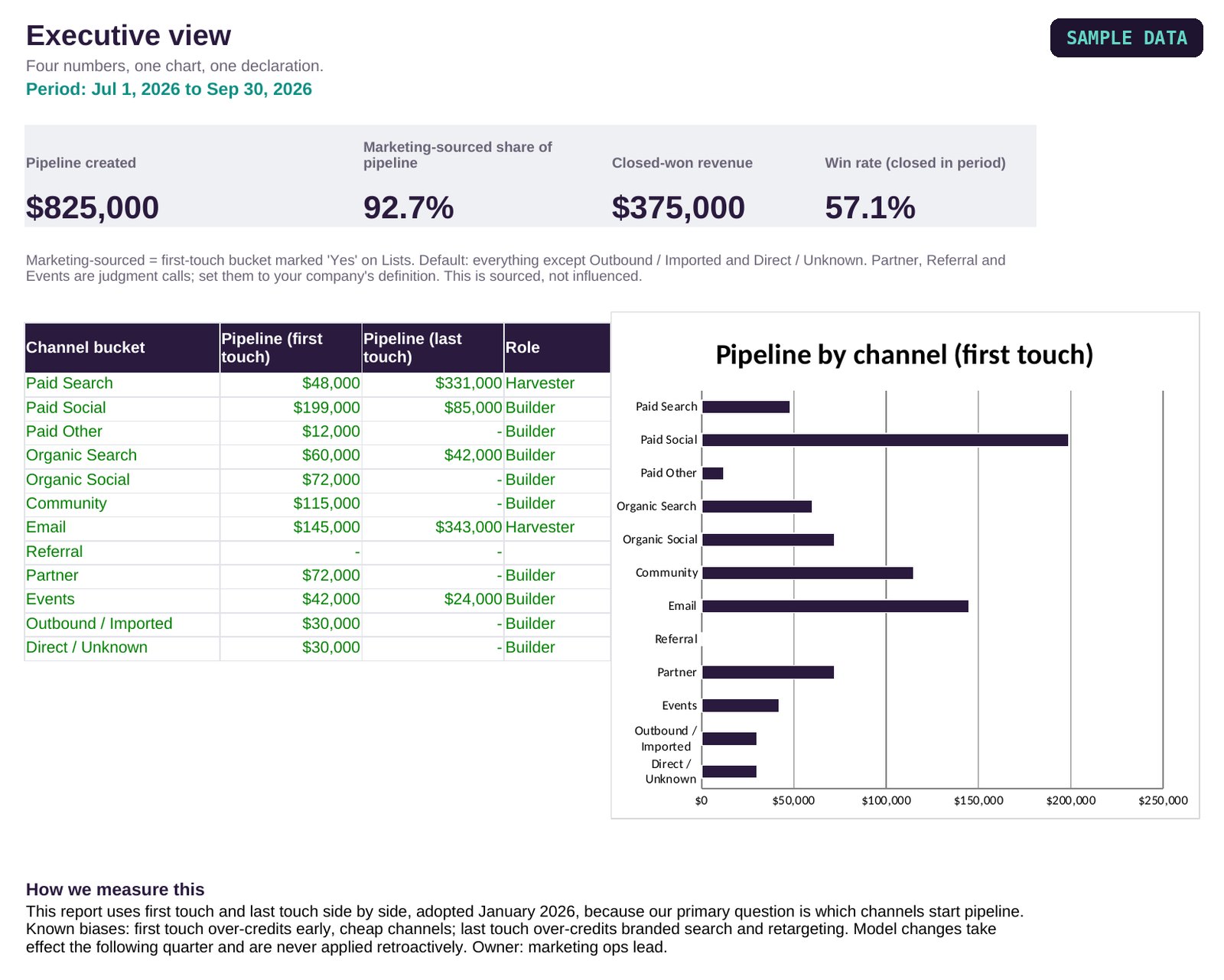
| Attribution dashboard | The pipeline-by-source view leadership will read. One page, five numbers. |
What’s in the files
Real screens from the files. Workbooks are shown with the sample data they ship with; guide pages are shown in part. Click any image to enlarge it.

Who it's for
- B2B marketing and revenue ops teams on HubSpot, Salesforce or both.
- Teams where every report gives a different answer to "where did this pipeline come from?"
- Teams who’d rather build it themselves than pay consultant rates for the same setup. (Hi. I’m the consultant. I’d still start here.)
If you don't know where your tracking breaks yet, start with the free marketing attribution audit. It tells you which parts of the system you need most.
How it works
- Buy and download. Everything arrives right after checkout.
- Open the Start Here. It shows the order to set things up in.
- Set it up in your stack. Start with the core: UTM rules, hidden fields and first-touch capture. The rest follows over 1 to 2 weeks.
Common questions
What's the difference between this and the $79 UTM System?
The UTM System fixes how links get tagged. The B2B Attribution System includes it, then covers everything after the click: GA4, the CRM, the model, cleanup and reporting.
Does it work with HubSpot and Salesforce?
Yes. The field maps cover both, and the setup accounts for the sync between them.
Do I need a developer?
No. Someone comfortable in your CRM admin settings and Google Tag Manager can run it. If nobody on your team has used Tag Manager before, give the GA4 part extra time.
What if I want someone to set it up for me?
That's a Health Check and build engagement. Start with a fit call and I'll tell you honestly whether it's worth it.
What am I allowed to do with it, and what if something's wrong?
One purchase covers one company: use it across your whole team. Consultants and agencies can use it with clients, one purchase per client company. Please don't resell it or post the files publicly. The files download as soon as you pay, so sales are final, but if a file is broken or doesn't match this page, email [email protected] within 30 days and I'll fix or replace it, or refund you in full if I can't. Fixes and updates to the files are free; email for the latest version or a lost download link. Questions about the files get a reply within two business days. Building it inside your CRM is on your team, or book a working session. Full terms.
Skip the build-it-from-scratch part
The B2B Attribution System
The UTM system, GA4 and CRM setup, the model decision guide, rebucketing and the dashboard. $399.
Get the Attribution SystemNot sure you need it? Run the free audit first.